
Secretary
Home, your super-agent, can be more than a chat that answers. With the secretary profile it becomes a chief of staff: it opens and closes your day, keeps your commitments ahead and watches your work every few hours, saying only what is worth an interruption. Everything it (or any agent) says unasked goes through one gate you control.
The “For you” tray
Section titled “The “For you” tray”For you in the top bar is the one place where everything that wants you lands:
| Kind | Example |
|---|---|
| Needs your OK | Tomás wants to run git push and asked first. |
| Task waiting for you | Lucía’s task is blocked on your answer. |
| Due | The Northwind quote is due today. |
| Routine | The low-stock routine found three products to reorder. |
| Agent | Vera finished the photos and let you know. |
| Channel | Someone new wrote on WhatsApp. |
An entry leaves by itself once it is answered, done or moved, and a newer notice about the same thing replaces the unread one. Channels only mirror the tray; the tray is the source.
❯ apx notifications
• 08/10/2026, 09:02:11  needs your OK · Run git push — Tomás wants to push the rates page
• 08/10/2026, 08:30:04  routine · Morning brief
07/10/2026, 18:30:02  task waiting · Send the wholesale quote

2 unread
apx notifications read marks them all read.
The interruption budget
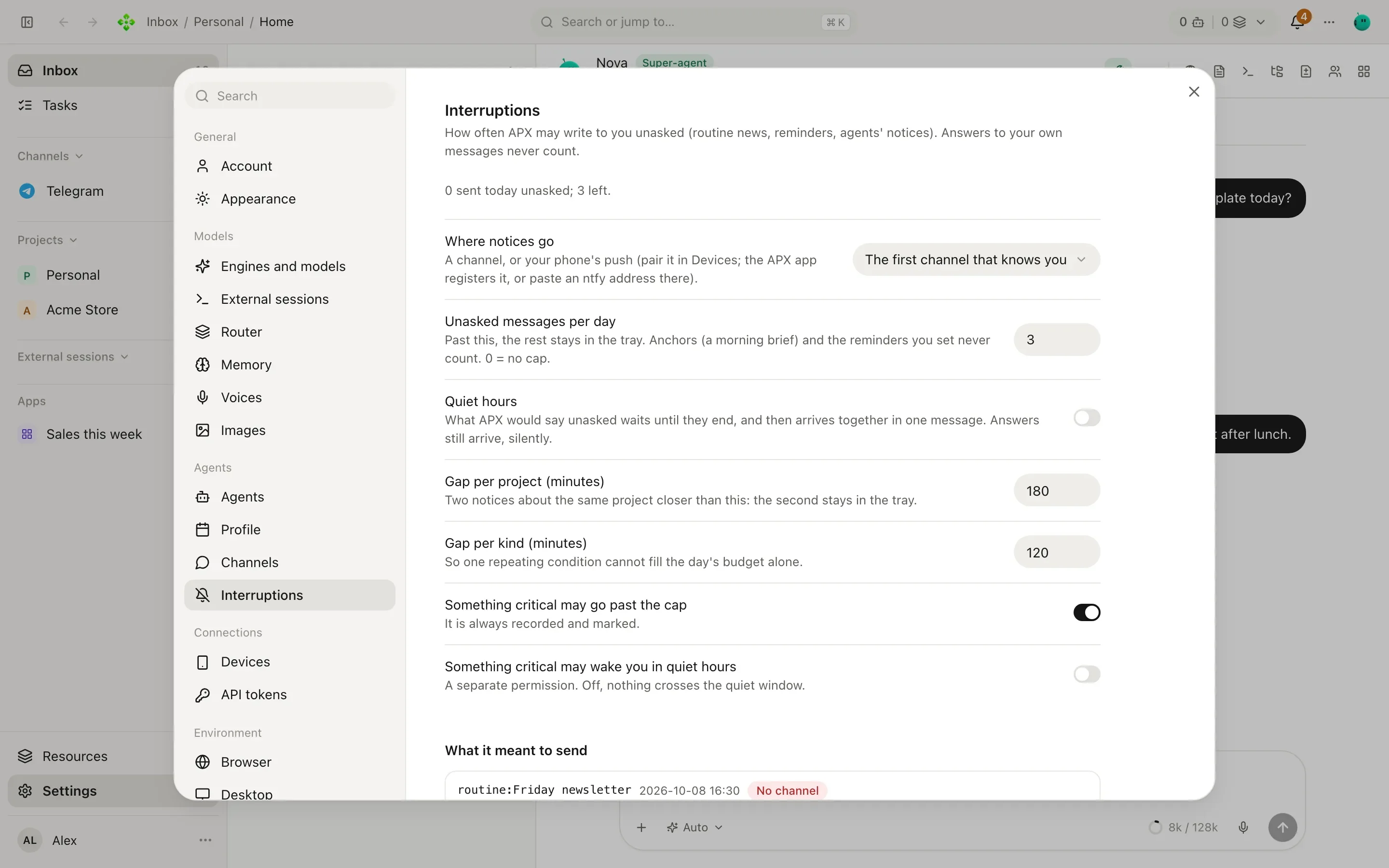
Section titled “The interruption budget”Messages you did not ask for (routine news, reminders you set, agents’ notices) go through one gate in Settings › Interruptions. Answers to your own messages never count, and neither do confirmations.
| Setting | What it does |
|---|---|
| Where notices go | A channel, or your phone’s push (pair it in Devices). By default, the first channel that knows you. |
| Unasked messages per day | The daily cap, 3 by default. Past it, the rest stays in the tray. 0 = no cap. |
| Quiet hours | What APX would say unasked waits until they end, then arrives together in one message. Answers still arrive, silently. |
| Gap per project | Two notices about the same project closer than this (180 min): the second stays in the tray. |
| Gap per kind | So one repeating condition cannot fill the day alone (120 min). |
| Something critical may go past the cap | On by default. It is always recorded and marked. |
| Something critical may wake you in quiet hours | A separate permission, off by default. |
Anchor routines (a morning brief) and the reminders you set never count against the cap. Below the settings, What it meant to send lists every unasked message and what happened to it: Sent, Sent together, Waiting for quiet hours to end, Only in the tray.
The secretary profile
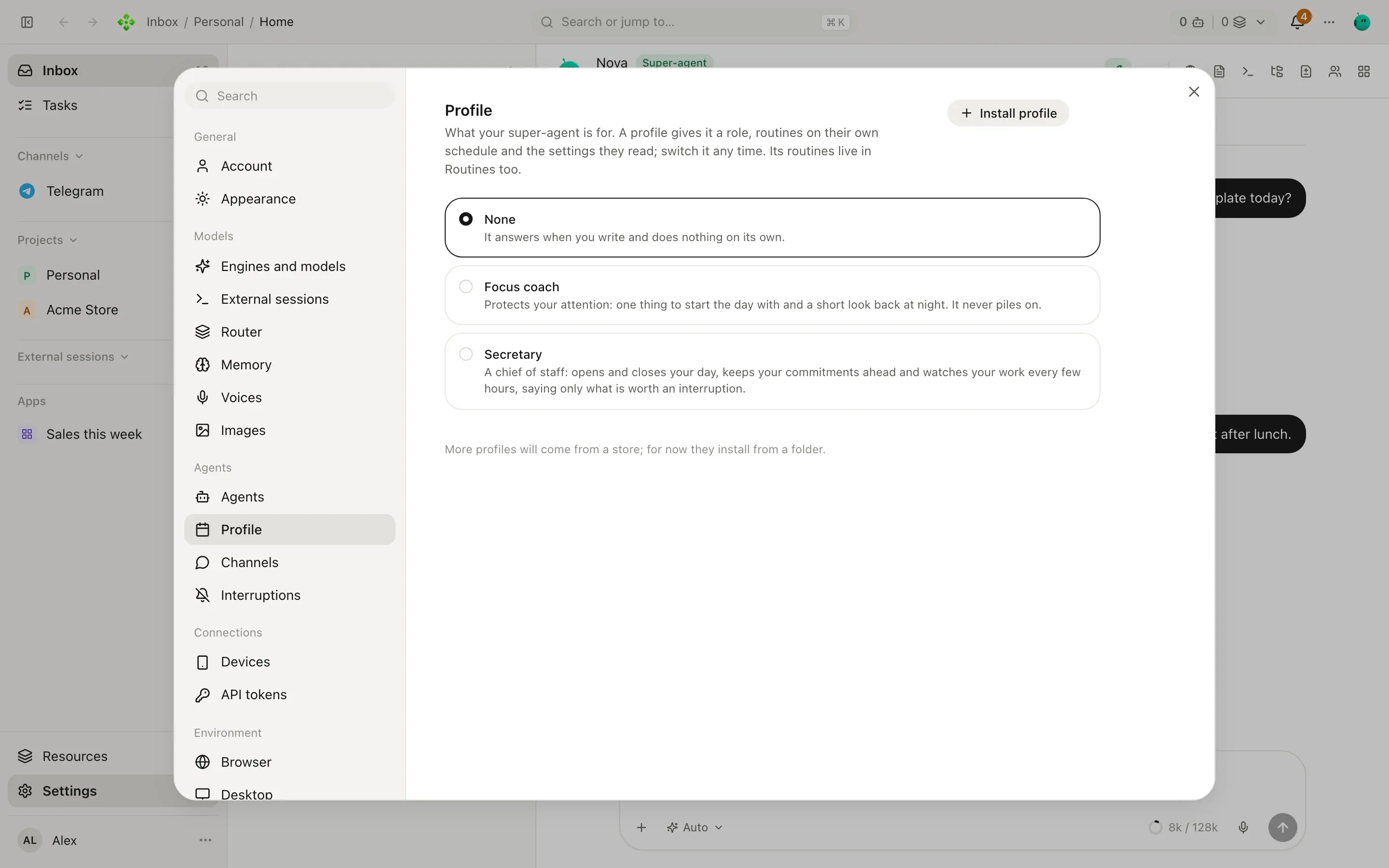
Section titled “The secretary profile”Settings › Profile says what your super-agent is for. None answers when you write and does nothing on its
own. Secretary gives it the chief-of-staff role, four routines and the settings they read. APX also ships a
Focus coach profile, and you can Install profile from a folder with an apx-profile.json.
| Setting | Default | What it does |
|---|---|---|
| Open the day | Weekdays 08:30 | Tasks and commitments due, today’s calendar and the one thing to start with. Always arrives. |
| Close the day | Weekdays 18:30 | What moved, what is stuck, what carries over, and whether today’s commitments were kept. Always arrives. |
| Watch every | 2 hours | Reads your work for something worth an interruption; stays quiet when there is nothing. Goes through the budget. |
| Team news every | 4 hours | What your other agents’ routines and notices had for you, told in one message. Stays quiet when there is nothing; not counted in the daily cap. |
| Calendar command | (empty) | Prints today’s agenda (for example gcalcli agenda). Its output reaches the morning brief as data. |
| A task waiting on you | 48 hours | After this long it is worth a word. |
| Raise a commitment | 48 hours | This long before its date, while there is still time to keep it. |
| A quiet project | 7 days | Open work and no movement for this many days. |
| How it addresses you | Neutral | Informal, Neutral or Formal. |
The four routines are ordinary routines you can see in the base project’s Routines tab (and under Its routines in the profile): day open and day close are anchors, the watch is a watcher, the team news is a relay. Saving the profile reschedules them. If you edit a prompt, your version stays; Restore puts the default back.
A morning with the secretary on, in Telegram:
Home: Morning. Due today: the Northwind quote (you owe it to Marta). Tomás’s rates page is in review since yesterday. Calendar: supplier call at 11. Start with the quote; it’s the one with a person waiting.
👍/👎 on unasked messages
Section titled “👍/👎 on unasked messages”Routine news and agents’ notices arrive as plain messages, with no buttons. To rate one, react to it: 👍 (or ❤️, 🔥, 👏) is useful, 👎 is not, and taking the reaction off takes the rating back. The Interruptions log rates them too, as Useful / Not useful.
- Mark a kind 👎 twice in 14 days, with no 👍 after, and the gate drops it (“you marked this kind unhelpful”) until a 👍 lifts it.
- A routine is told its own counts in its next run, so it can adjust what it says.
- Anchors, reminders you set and critical messages are never muted.
Agents reach you only through notify_owner
Section titled “Agents reach you only through notify_owner”Any agent can tell you something unasked, but only one way: its notify_owner tool. The message goes through the
same budget as routines, counted per agent (so your 👍/👎 tune each agent separately), and lands in the tray either
way. The tool tells the agent what the gate did, so a dropped message is not retried. It is not available in a
routine’s own run (its answer is already delivered), between agents, or in a contact’s chat.
One voice: the team news
Section titled “One voice: the team news”While a Team news routine is on (the secretary’s is), your other agents never write to you on their own: what their
routines and notify_owner have for you waits, and every few hours your super-agent tells it in one message, a line
or two per agent, leaving out what doesn’t matter. Only three things skip the wait: the super-agent’s own messages, a
routine you made an anchor, and a critical notice. With no team news routine, each agent’s news goes through the budget
on its own, as above.
Commitments at day close
Section titled “Commitments at day close”The day close asks how today’s commitments went. You answer in your own words (“the quote went out, the photos slipped to Monday”) and the agent records it: Kept, Missed, released, or a New date. Agents never settle a commitment on their own. See Tasks › Commitments.